How long can a WhatsApp Status video be?
By the VividStatus team · Sources checked on
A WhatsApp Status video can be up to 90 seconds long, and every status disappears from view 24 hours after you post it. Both figures come from WhatsApp’s own Help Center page for iPhone, checked on 25 September 2026. Longer videos have to be trimmed or split into several statuses posted one after another.
Figures of 30 or 60 seconds still circulate in older articles and forum threads. The table below separates what WhatsApp publishes from what the VividStatus app does, so you can see which number comes from where.
What WhatsApp says, and what VividStatus does
| Question | Answer | Where it comes from |
|---|---|---|
| Longest video in one status | 90 seconds | WhatsApp Help Center, iPhone |
| How long a status stays visible | 24 hours after you post it | WhatsApp Help Center, iPhone |
| Video formats WhatsApp names | 3GP and MPEG-4 | WhatsApp Help Center, iPhone |
| Shortening a video inside WhatsApp | Drag the slider at the top of the video | WhatsApp Help Center, iPhone |
| Longest part VividStatus prepares | 90 seconds; you can pick Auto, 30 s, 60 s, 90 s or Custom | VividStatus app |
| Video file VividStatus hands over | H.264 in an MP4 file, 1080 × 1920 pixels in Quick Post | VividStatus app |
WhatsApp figures checked on 25 September 2026. WhatsApp can change them at any time; the source link below always shows the current wording.
Is the limit 30, 60 or 90 seconds?
On 25 September 2026 WhatsApp’s iPhone help page says: “Videos can be up to 90 seconds long.” That is the figure to plan around. The 30-second number in older tutorials does not match what WhatsApp publishes today.
VividStatus cannot read which limit your installed copy of WhatsApp applies. If the status editor in WhatsApp offers you less than 90 seconds, trust what WhatsApp shows you and choose a shorter part length in VividStatus.
What happens if the video is longer than 90 seconds?
WhatsApp’s status editor shows a slider at the top of the video so you can shorten it. Whatever you trim away is not posted. To share the whole video, you need several files, each 90 seconds or shorter, posted as separate statuses.
Each of those statuses has its own 24-hour clock. If you post Part 1 in the morning and Part 2 in the evening, Part 1 also disappears first, so post all parts in one sitting.
How many parts does a long video need?
VividStatus shares a video evenly across the number of parts it needs, and no part is ever longer than the length you pick. These are the results for two common choices:
| Video length | Parts of up to 90 s | Parts of up to 30 s |
|---|---|---|
| 0:45 | 1 status of 45 s | 2 parts of 22.5 s |
| 1:30 | 1 status of 90 s | 3 parts of 30 s |
| 2:10 | 2 parts of 65 s | 5 parts of 26 s |
| 3:00 | 2 parts of 90 s | 6 parts of 30 s |
| 4:00 | 3 parts of 80 s | 8 parts of 30 s |
| 5:00 | 4 parts of 75 s | 10 parts of 30 s |
| 10:00 | 7 parts of about 86 s | 20 parts of 30 s |
Calculated with the rule in the VividStatus app: number of parts = video length ÷ part length, rounded up; each part = video length ÷ number of parts.
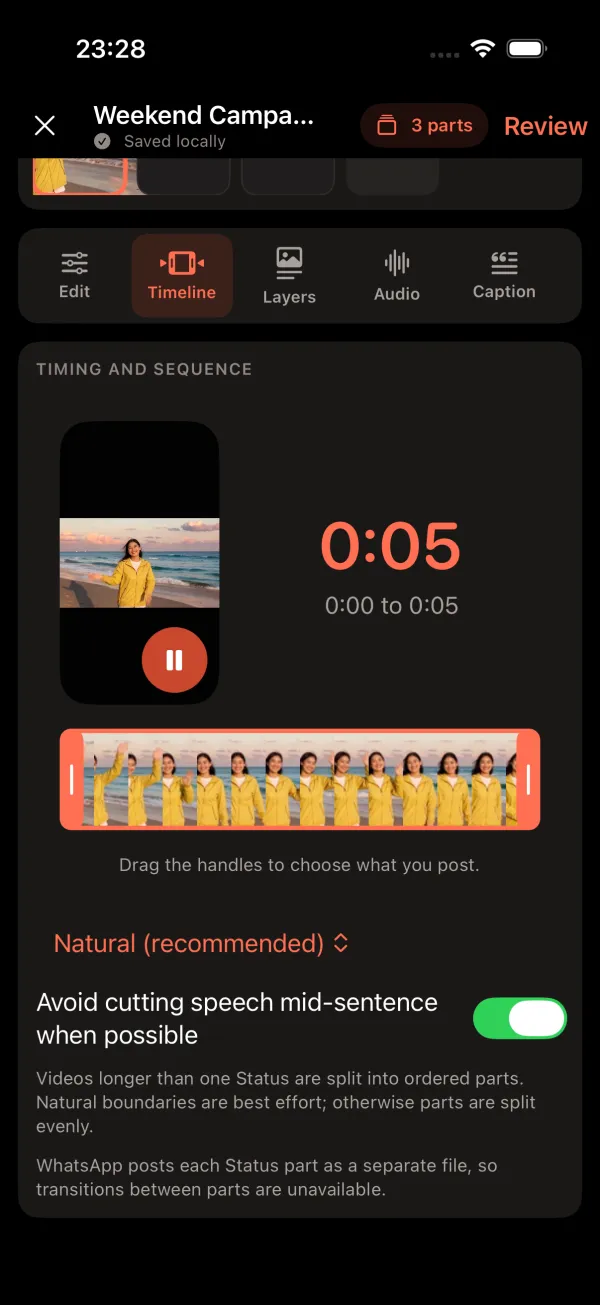
How do you split a long video with VividStatus?
Open Quick Post and choose the video.
Tap Choose media on the Home screen and pick the clip from your library.
Choose Split and a part length.
Pick Auto, 30 s, 60 s, 90 s or Custom. The app tells you in one sentence how many parts you will get and how long each one is.
Prepare the parts.
Your iPhone renders numbered parts; nothing is uploaded to a VividStatus server.
Post them in order.
Start with Part 1: VividStatus opens it in WhatsApp’s status screen, where you check it and share it. Then do the same with Part 2 and the rest.
Questions about Status length
How long does a WhatsApp status last?
A status disappears from view 24 hours after you post it, according to WhatsApp’s Help Center. Each part of a split video counts as its own status with its own 24 hours.
Can I post a 3-minute video as one status?
Not as one status: the maximum WhatsApp names is 90 seconds. A 3-minute video fits exactly into two 90-second parts.
Does VividStatus change WhatsApp’s limit?
No. VividStatus prepares files on your iPhone; WhatsApp’s limit still applies to every file you post.
Can I choose parts shorter than 90 seconds?
Yes. Choose 30 s, 60 s or Custom. The video is still shared out evenly, so a 2:10 clip at 30 seconds becomes five parts of 26 seconds instead of four full parts and a short leftover.
Sources
Sources checked on 25 September 2026. Spotted a mistake? Email [email protected] and we will correct this page.