WhatsApp Status black bars: fit or fill a video for 9:16
By the VividStatus team · Sources checked on
Black bars appear around a WhatsApp Status when the video’s shape does not match a portrait phone screen. A 16:9 landscape clip shown whole in a 9:16 frame covers only 31.6 % of the frame’s height, so the rest is empty. You can keep the whole picture on a background, or fill the frame and crop the sides.
There is no setting that removes the bars without one of those two trade-offs. The numbers below show how big the trade-off is for the shapes people usually film in.
How much do you lose with each shape?
| Aspect ratio of your video | Show all: share of the screen height with picture | Fill: share of the picture width you keep |
|---|---|---|
| 16:9 (landscape, most phone videos filmed sideways) | 31.6 % | 31.6 % |
| 4:3 (older cameras, many photos) | 42.2 % | 42.2 % |
| 1:1 (square) | 56.3 % | 56.3 % |
| 4:5 (tall feed format) | 70.3 % | 70.3 % |
| 3:4 (portrait photo) | 75.0 % | 75.0 % |
| 9:16 (portrait video) | 100 % | 100 % |
For any shape wider than 9:16 both figures are the same: (9 ÷ 16) ÷ (width ÷ height). Example for 16:9: 0.5625 ÷ 1.778 = 0.316.
Which framing options does VividStatus give you?
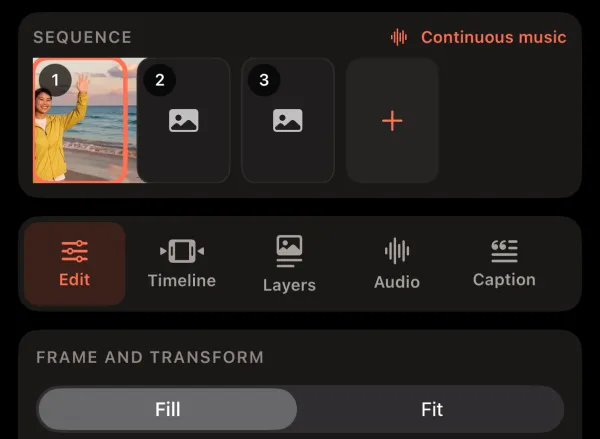
Quick Post offers three choices for one photo or video; Studio has Fill and Fit under Frame and Transform.
- Fill. Fills the screen. The edges are cut off and your subject stays centred.
- Show all. Nothing is cut off. The empty area gets blurred media by default; under Settings > Fit background you can switch to black or white.
- Crop. You drag the frame yourself and choose exactly which part to keep.
Show all, Fill or Crop: which one should you use?
Use Show all when the whole scene matters: a group photo, a landscape, a slide with text across the full width. A blurred background looks calmer than black bars and still keeps every person in the picture.
Use Fill when the action is in the middle, like a person talking to the camera. Keep in mind that filling from a landscape clip enlarges a narrow slice of it, which costs sharpness.
Use Crop when the subject is off-centre. Fill keeps the middle; with Crop you can keep the left or right third instead.
Can WhatsApp itself remove the bars?
For photos, WhatsApp’s status editor has a crop and rotate tool. For videos, its iPhone help page describes trimming the length, not changing the shape. That is why the shape is best decided before you post.
Questions about black bars
Why are there black bars on my WhatsApp status?
Because the video is wider than a portrait phone screen. A picture that is shown whole leaves empty space above and below, and that space is filled with a colour, usually black.
Can I get rid of the bars without cropping?
Not completely. You can make them less noticeable with a blurred background of the same video, which is what Show all in VividStatus uses by default.
What shape should a video for WhatsApp Status have?
Portrait 9:16 fills the screen without bars or cropping. VividStatus exports every Status video in that shape, at 1080 × 1920 pixels in Quick Post.
Sources
Sources checked on 25 September 2026. Spotted a mistake? Email [email protected] and we will correct this page.